
Analytics
Comprehensive guide to LinkAssist Analytics — track key metrics, health score, post-by-post performance, viral patterns, and timing intelligence.
The LinkAssist Analytics suite transforms raw LinkedIn engagement into actionable intelligence. By evaluating posting cadence, reach efficiency, conversation depth, and audience response, it helps you identify what content truly drives your LinkedIn growth.
1. Key Metrics & Growth Trends
The analytics overview provides a macro snapshot of your overall content performance across selectable date ranges (7D, 30D, 90D, 1Y, All Time, or Custom Range).
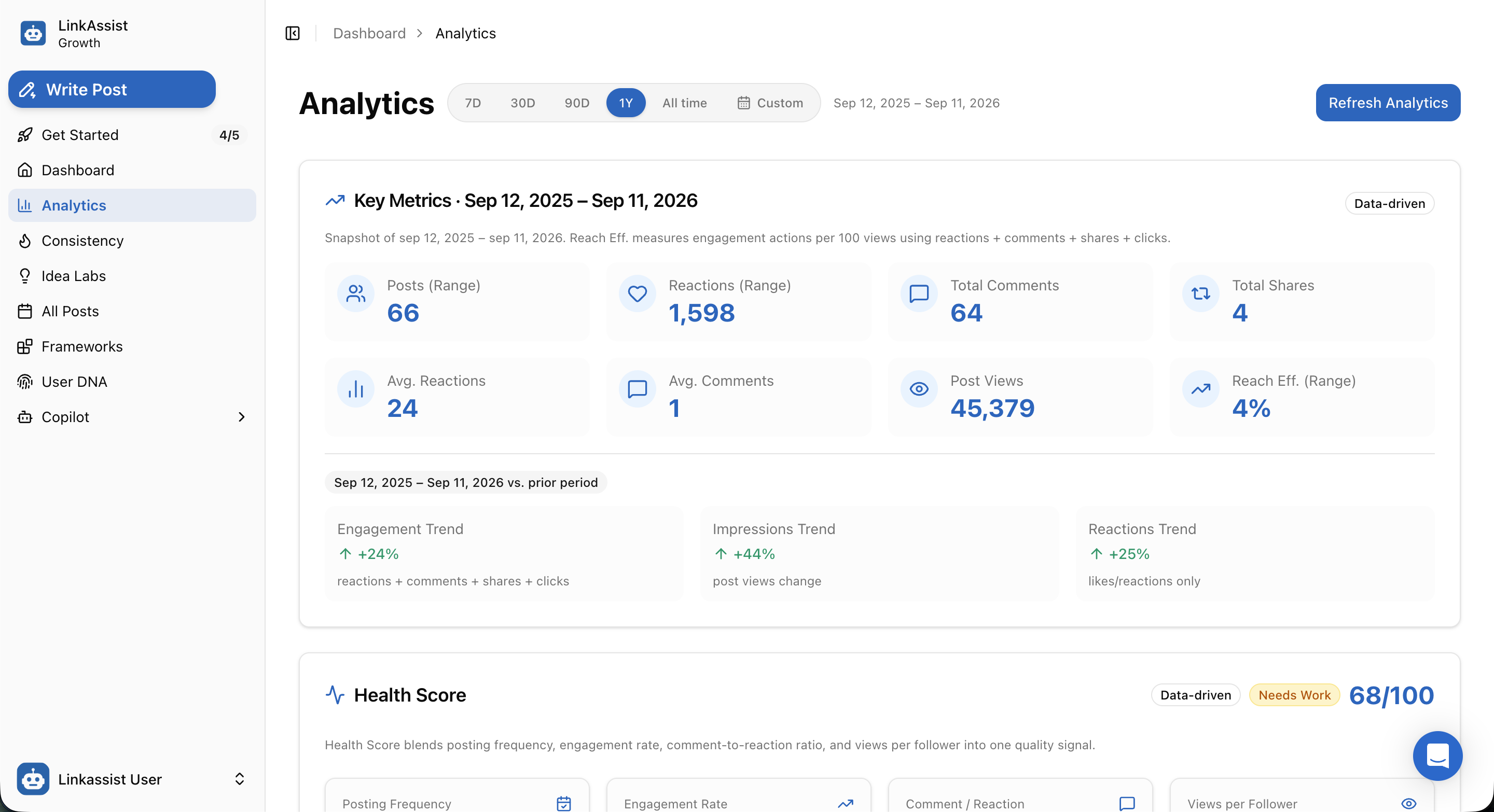
Core Metrics Breakdown
| Metric | What It Measures | Target / Insight |
|---|---|---|
| Posts (Range) | Total count of published posts within the selected time window. | Measures your total content volume. |
| Reactions (Range) | Total aggregate likes, celebrates, supports, and insights received. | Reflects top-of-funnel audience agreement. |
| Total Comments | Total comments left across all published posts. | Direct indicator of conversation and relationship building. |
| Total Shares | Number of times your content was reposted by other members. | High virality signal; multiplies 2nd/3rd-degree reach. |
| Avg. Reactions & Comments | Mean engagement actions per individual post. | Normalizes performance regardless of post volume. |
| Post Views | Total impressions generated across the feed. | Total eyeballs on your personal brand. |
| Reach Efficiency (Range) | Ratio of total engagement actions per 100 views (reactions + comments + shares + clicks) / views. | Target: 3% - 6%+ for high-relevance content. |
Period-over-Period Trend Indicators
Directly below the metrics grid, LinkAssist compares your current performance against the prior identical time period:
- Engagement Trend: Percentage change in total combined engagement actions (
↑ +24%). - Impressions Trend: Growth trajectory in total post views (
↑ +44%). - Reactions Trend: Growth in net reactions (
↑ +25%).
2. Creator Health Score
The Health Score is a composite metric (scored out of 100) that evaluates the structural quality of your LinkedIn content engine.
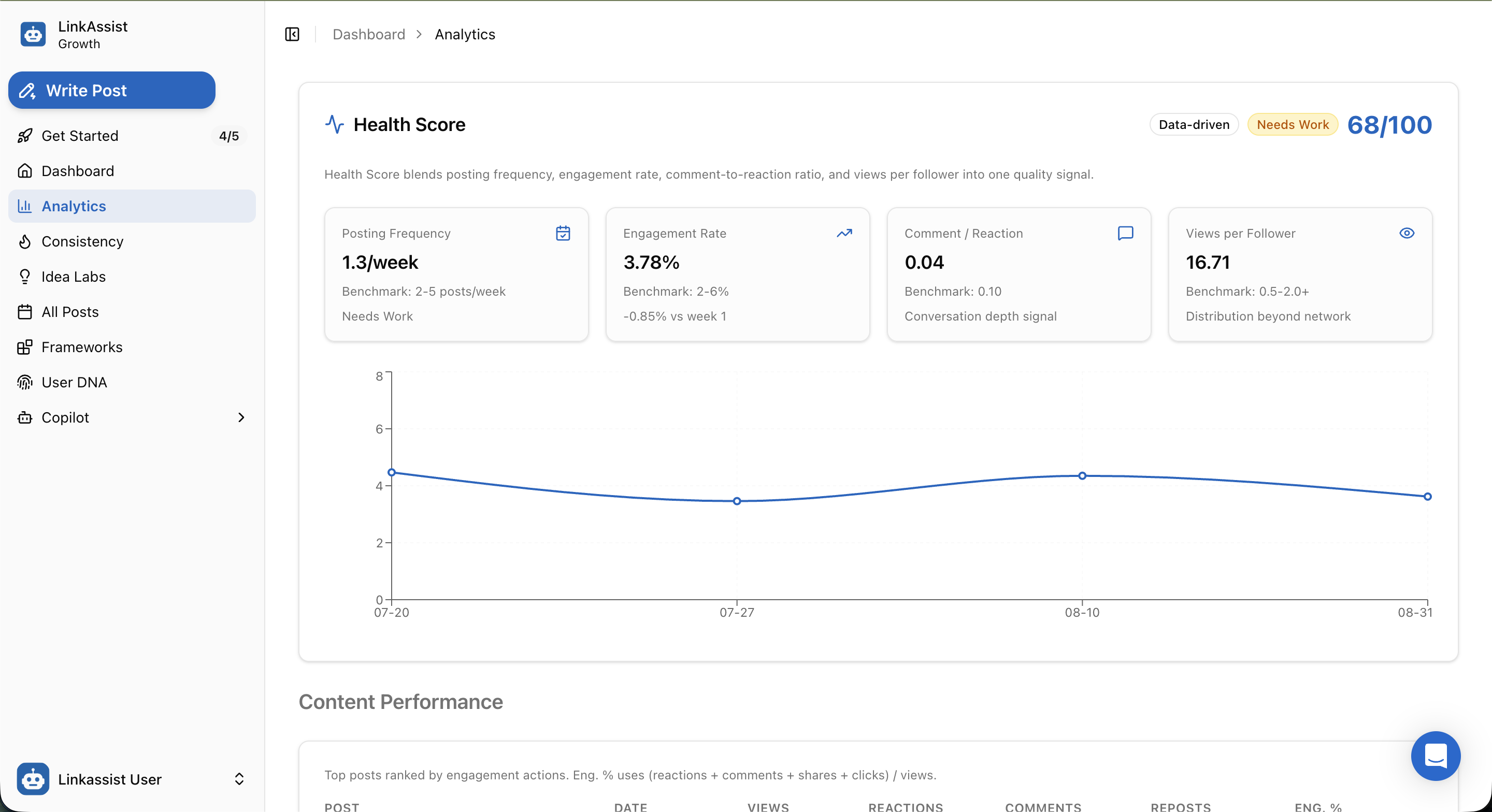
Rather than evaluating volume alone, the Health Score blends four diagnostic pillars against industry benchmarks:
- Posting Frequency (Benchmark: 2–5 posts/week): Evaluates publishing regularity. Falling below 2 posts/week flags a Needs Work status due to algorithmic penalty.
- Engagement Rate (Benchmark: 2%–6%): The percentage of viewers who interact with your content.
- Comment / Reaction Ratio (Benchmark: 0.10): Measures conversation depth. A higher ratio indicates posts that spark genuine discussion rather than passive scrolling likes.
- Views per Follower (Benchmark: 0.5–2.0+): Measures content distribution beyond your existing 1st-degree network into 2nd/3rd-degree feeds.
Engagement Rate Over Time
An interactive trend line charts weekly engagement percentage fluctuations, allowing you to correlate strategy changes with audience response.
3. Post-by-Post Content Performance
The Content Performance table ranks every published post in descending order of engagement efficiency.
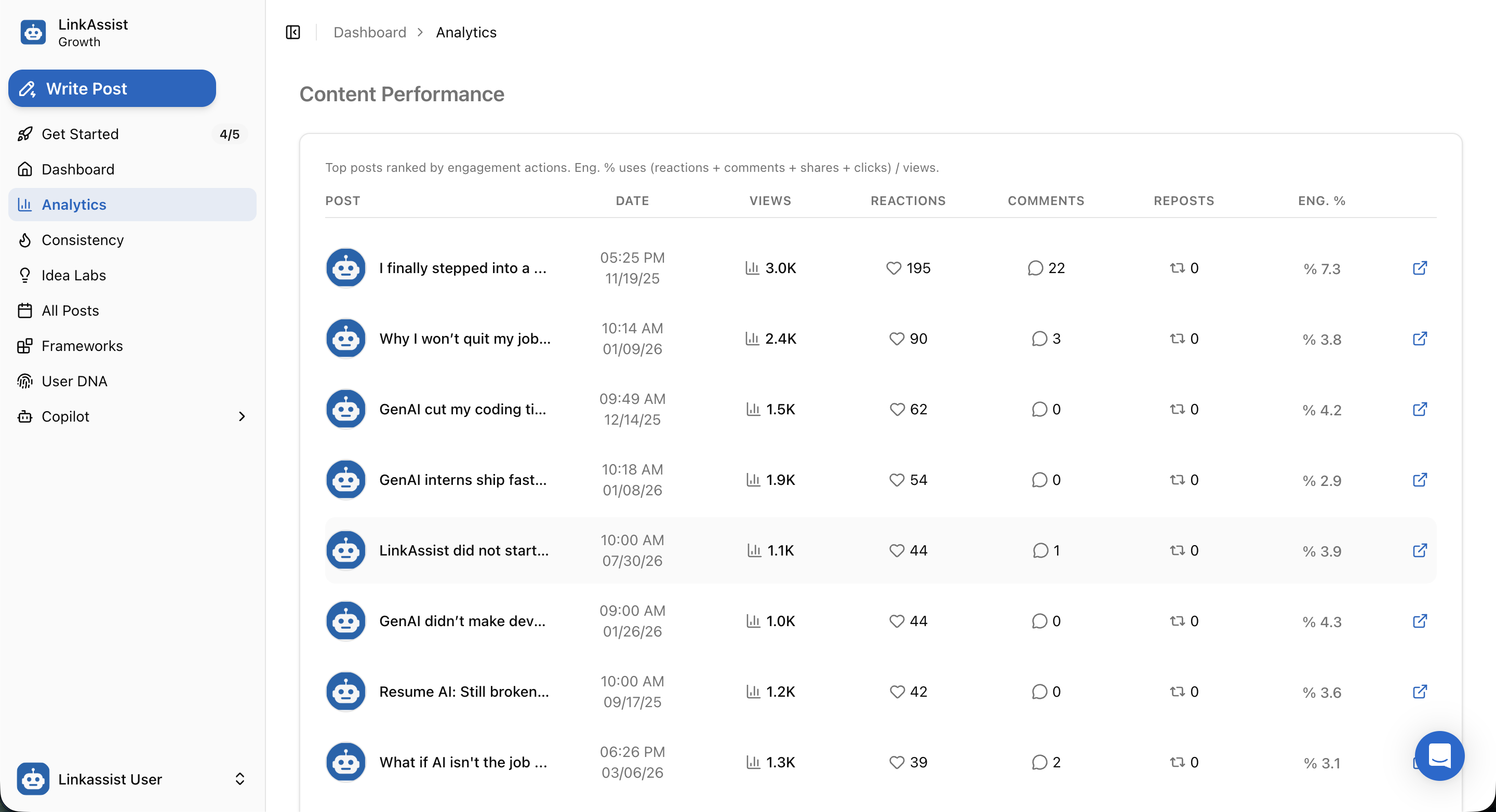
Table Data Columns:
- Post: Preview snippet of the post hook and topic angle.
- Date: Precise publication date and timestamp.
- Views: Total impressions accrued (e.g.,
3.0K,2.4K,1.5K). - Reactions & Comments: Granular engagement breakdown.
- Reposts: Total shares generated.
- Eng. %: Net engagement rate calculated as
(reactions + comments + shares + clicks) / views. - Open Link (↗): One-click shortcut to inspect the live post directly on LinkedIn.
4. Top Performers & Pattern Attribution
The Top Performers module isolates your highest-converting content and automatically tags the directional causes behind their success.
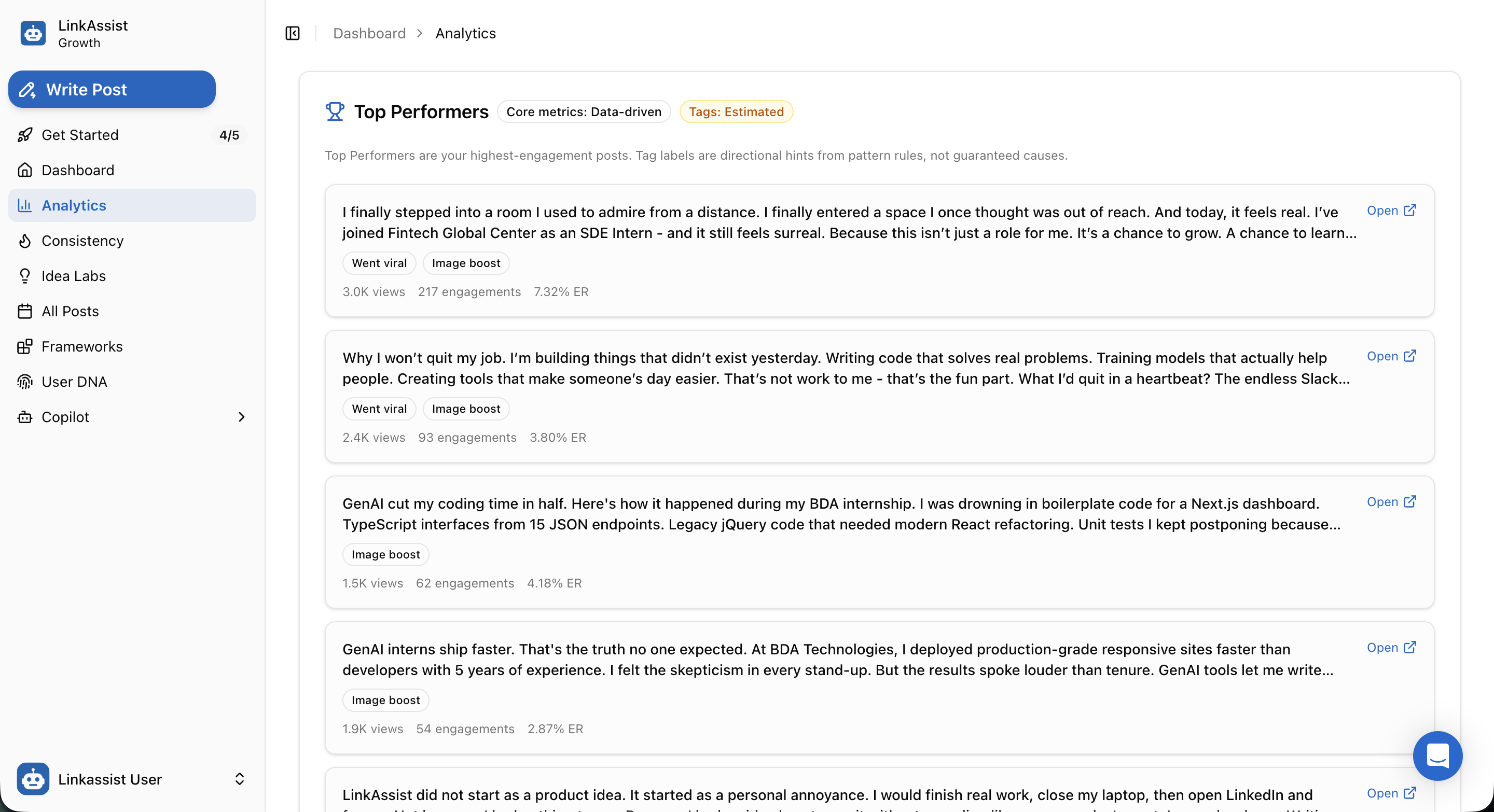
Pattern Tags & Insights
Went viral— Posts exceeding standard engagement thresholds by over 2x.Image boost— Visual posts (carousels, infographics, or photos) that generated above-average dwell time.- Granular Post Stats — Instantly view total views, engagement count, and exact ER for your top winners.
Repurpose Top Performers
Identify recurring themes in your Top Performers and feed them back into Idea Labs or Frameworks to recreate winning hooks with fresh angles.
5. Timing Intelligence & Golden Hour Windows
Posting when your audience is actively browsing maximizes initial velocity, which signals the LinkedIn algorithm to amplify your reach.
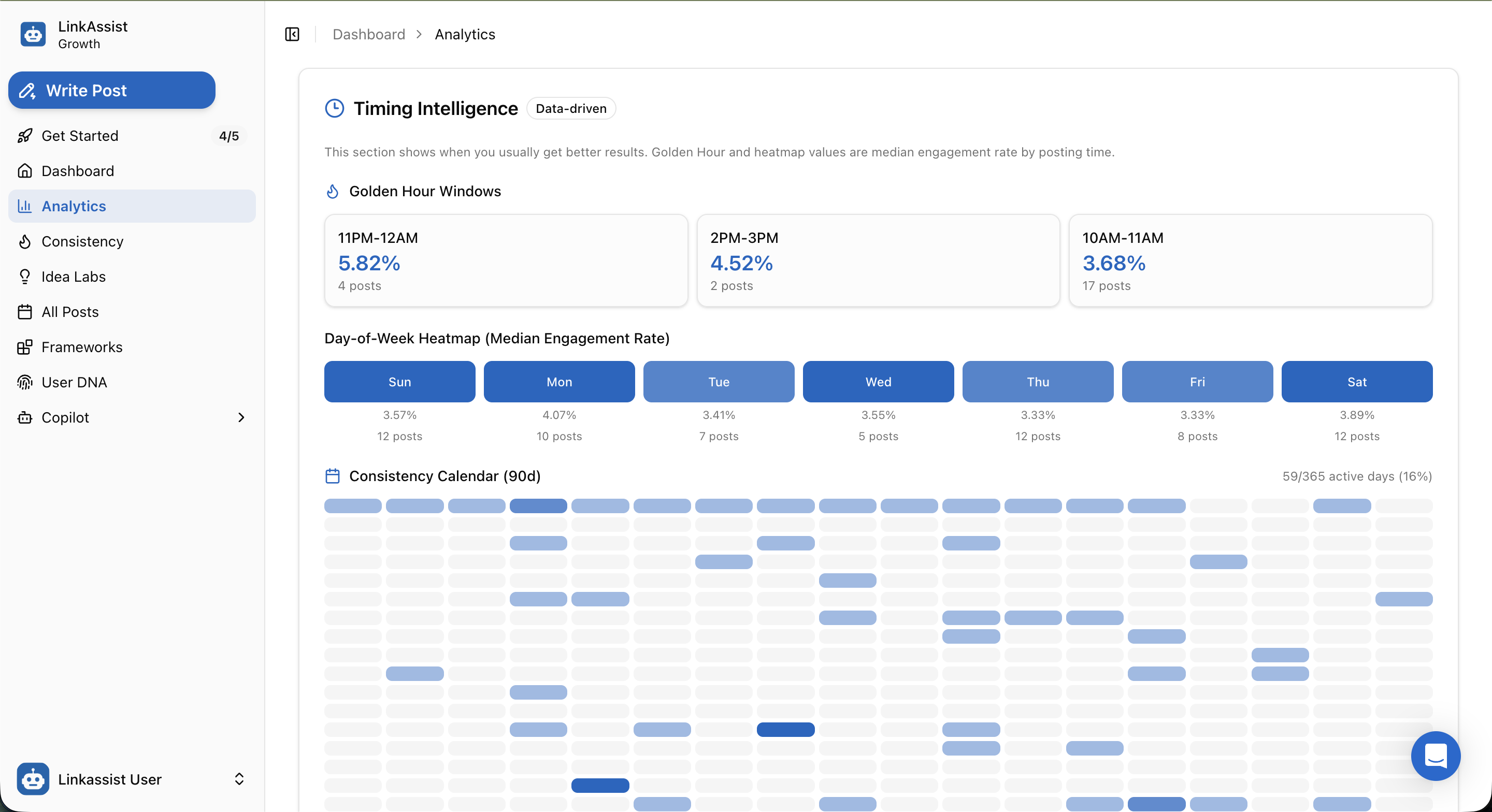
Key Timing Features:
- Golden Hour Windows:
- Highlights your top 3 time slots with the highest median engagement rates (e.g., 11PM–12AM at 5.82% ER, 2PM–3PM at 4.52% ER, 10AM–11AM at 3.68% ER).
- Day-of-Week Heatmap:
- Aggregates median engagement rates across every day of the week (Sunday through Saturday), helping you determine your best days to publish high-stakes announcements.
- 90-Day Consistency Calendar:
- Visual activity grid tracking total active publishing days (e.g., 59/365 active days) to maintain consistent momentum.
Next Steps
Use your analytics data to optimize your ongoing content strategy and rhythm:
Consistency Tracker
Build an unbroken weekly publishing rhythm and track your outreach goals.
Copilot AI Strategist
Turn analytics insights into actionable recommendations with conversational AI strategy generation.
Distribution Calendar
Schedule your upcoming posts during your optimal Golden Hour windows.
Post Writer
Craft your next post using proven frameworks derived from your Top Performers.