
Copilot
Interactive conversational AI partner for LinkedIn strategy planning, trend ideation, and end-to-end post crafting.
LinkAssist Copilot (formerly Strategy) is your dedicated, conversational AI strategist and writing assistant. Powered by your calibrated User DNA, Copilot collaborates with you in real time to build strategic content plans, brainstorm timely trend angles, and craft publication-ready LinkedIn posts.
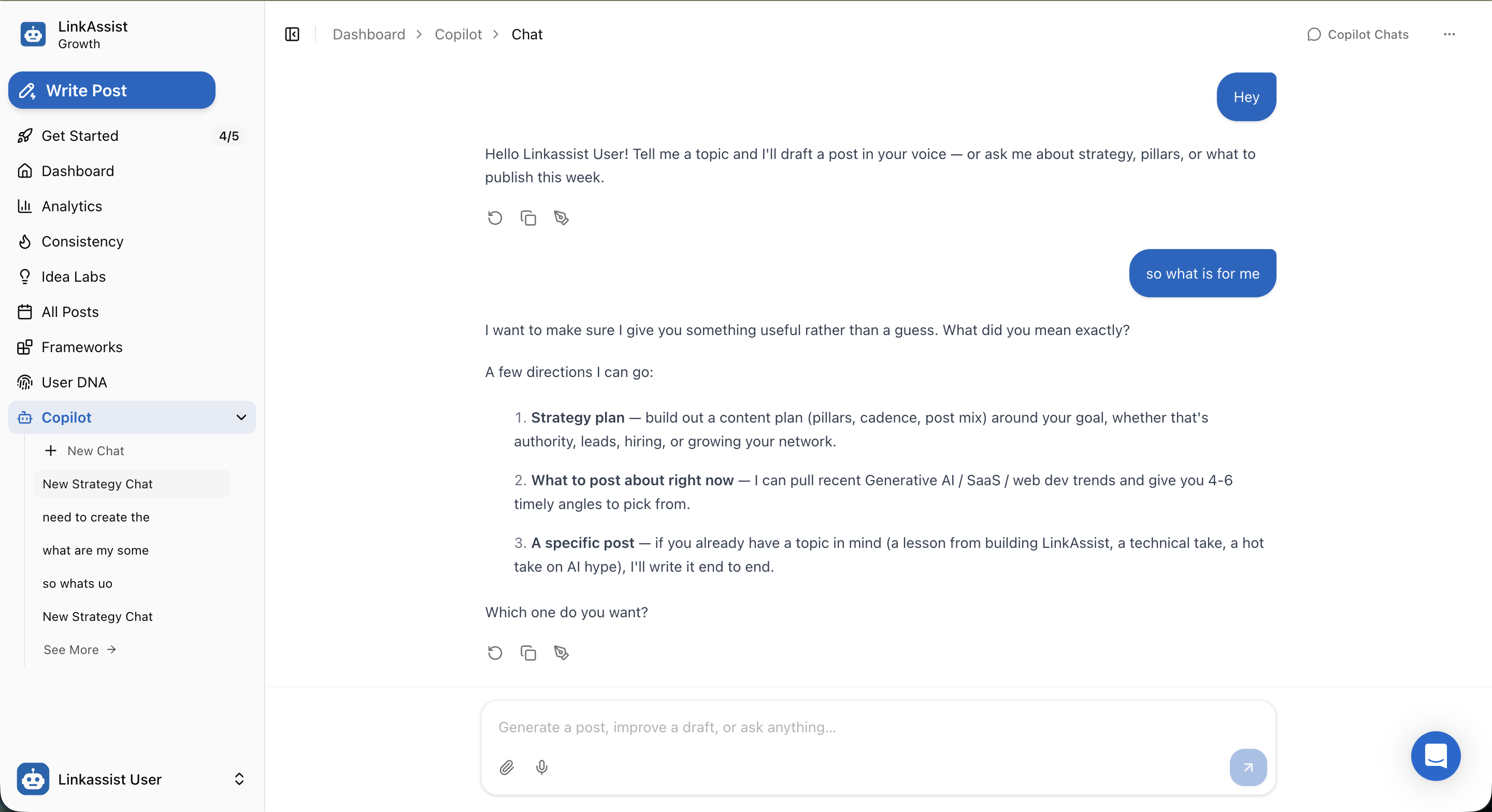
1. Three Core Capabilities
When chatting with Copilot, it intelligently clarifies your goals and guides you down three distinct creative pathways:
🎯 1. Strategy Plan
Build out a comprehensive content plan (content pillars, posting cadence, post mix) aligned with your primary goal — whether that's authority, inbound leads, hiring, or network growth.
⚡ 2. Real-Time Trends
Ask "What to post about right now?" to extract timely industry trends (GenAI, SaaS, Tech, Business) with 4–6 tailored post angles ready to pick from.
✍️ 3. Full Post Drafting
Have a specific idea or lesson in mind? Give Copilot a rough thought or voice memo, and it will draft a complete, hook-optimized LinkedIn post in your authentic voice.
2. Interactive Chat Interface & Controls
Copilot provides a distraction-free, feature-rich conversational environment:
Multi-Session Management (Sidebar)
+ New Chat— Start fresh brainstorm sessions without cluttering previous strategy threads.- Chat History — Jump between specialized conversations (e.g., Strategy Planning, Product Launch Campaign, Weekly Hook Brainstorming).
- Session Actions — Rename, review, or archive previous chat threads via the sidebar menu.
Rich Input Bar
- 💬 Natural Language Prompts — Ask open-ended strategic questions or dictate specific formatting requirements.
- 📎 File & Resource Attachments — Upload drafts, articles, PDFs, or outlines for Copilot to analyze and summarize.
- 🎙️ Voice Dictation — Speak your raw thoughts on the go and let Copilot transform them into structured text.
Post-Generation Quick Actions
Directly below every Copilot response, three one-click utility buttons help speed up your workflow:
- 🔄 Regenerate — Request an alternative perspective or different tone angle.
- 📋 Copy to Clipboard — Instant one-click copy to paste into LinkedIn or drafts.
- 🪄 Refine & Polish — Make targeted edits, shorten hooks, or adjust bullet spacing.
3. High-Impact Prompt Examples
Strategy & Content Mix:
"Help me design a 4-week content calendar focused on generating inbound leads for my B2B SaaS startup. I want to post 4 times a week."
Trending Topics & Hooks:
"What are the top 3 contrarian angles on AI automation in software engineering right now? Give me 5 scroll-stopping hooks for each."
Post Transformation:
"Here are my messy notes from a client call where we fixed a 50% drop in conversion rate. Turn this into a story-driven LinkedIn post with a strong takeaway."
Trained on Your User DNA
Copilot automatically incorporates your preferences, niche guidelines, and tone rules configured in User Onboarding, so you never have to repeat your background in every prompt.
Next Steps
Turn Copilot's strategic ideas into scheduled posts:
Post Writer
Take Copilot drafts and polish them with viral frameworks and character limits.
Idea Labs
Expand Copilot topic suggestions into dozens of hook-ready variations.
Consistency Tracker
Ensure your new content strategy aligns with your weekly publishing quota.
Analytics
Monitor how your strategy and topic mix perform in terms of impressions and engagement.