
Dashboard
Real-time overview of your LinkedIn performance metrics, growth KPIs, consistency streak calendar, and daily engagement activity.
The LinkAssist Dashboard is your central command center. It provides real-time visibility into your LinkedIn audience growth, profile visibility, content consistency streak, and daily engagement tracking.
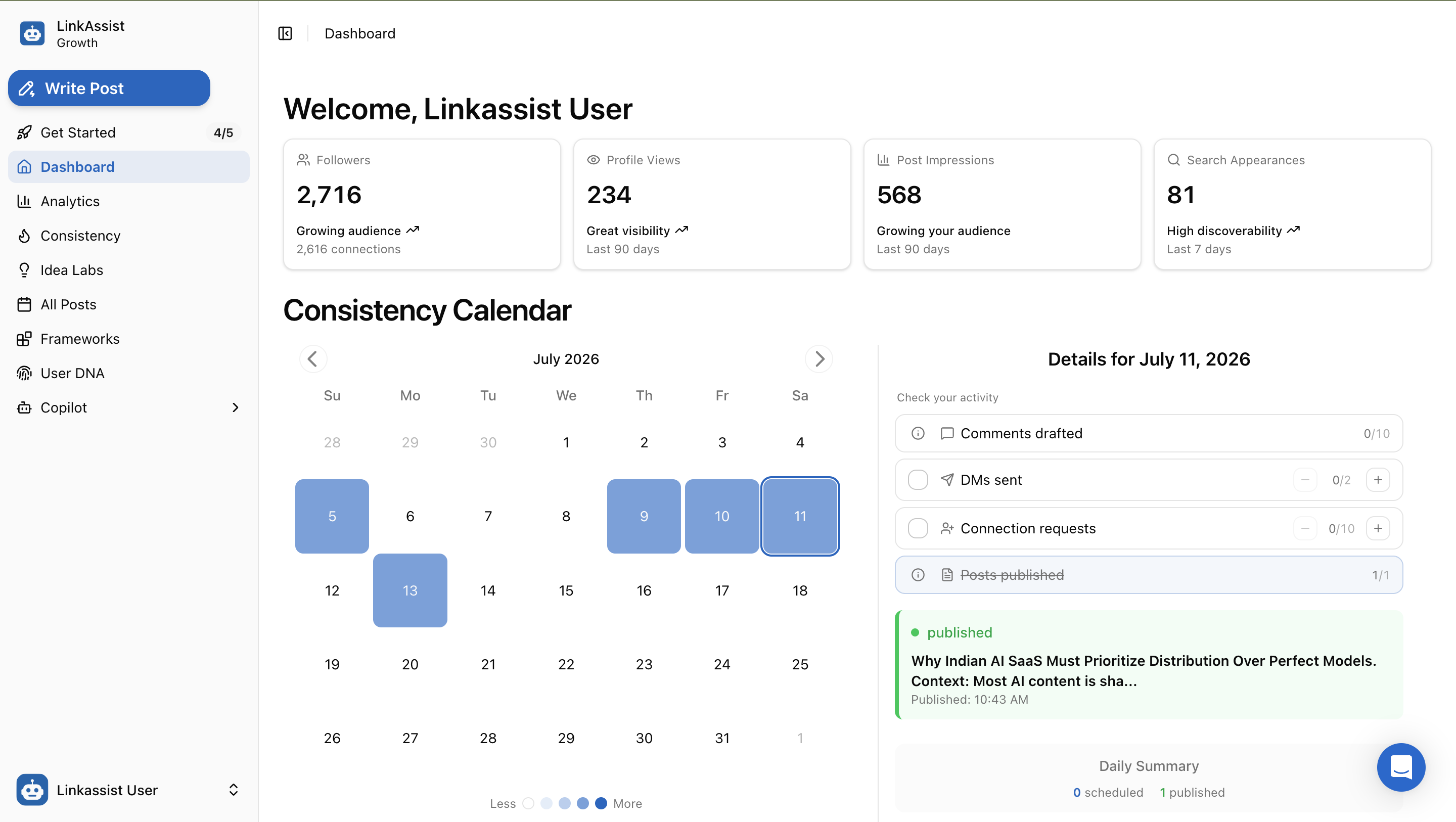
1. Key Performance Indicators (KPIs)
At the top of the dashboard, four primary metric cards track your core LinkedIn reach and visibility:
| Metric | Description & Period | Growth Indicator |
|---|---|---|
| Followers | Total audience size and total connected 1st-degree connections. | Growing audience ↗ |
| Profile Views | Total views on your LinkedIn profile over the last 90 days. | Great visibility ↗ |
| Post Impressions | Aggregate content impressions generated across your published posts over the last 90 days. | Growing your audience |
| Search Appearances | How many times your profile appeared in LinkedIn searches over the last 7 days. | High discoverability ↗ |
Automatic Metric Sync
Metrics are automatically synchronized via your connected LinkedIn profile and the LinkAssist Chrome extension.
2. Consistency Calendar & Heatmap
Maintaining regular posting frequency is the #1 factor in LinkedIn algorithm distribution. The Consistency Calendar visualizes your publishing cadence with an activity heatmap.
- Color Intensity Legend: Shading ranges from light to deep blue (
Less ○ ◯ ⬤ ⬤ More) based on publishing and engagement volume. - Interactive Day Selection: Click any date on the monthly calendar (e.g., July 11) to inspect that day's scheduled posts, published content, and outreach progress.
- Streak Tracking: Helps you spot gaps in your weekly schedule and maintain an unbroken publishing rhythm.
3. Daily Activity & Outreach Tracker
Selecting a date opens the Activity Checklist for that specific day. This ensures you balance content publishing with active outbound networking:
💬 Comments Drafted
Track your goal of insightful comments on prospect posts (e.g., target 0/10) using AI-assisted commenting.
✉️ DMs & Connection Requests
Counter buttons (- / +) to record outbound direct messages and personalized connection invites sent.
Published Post Details
Under the checklist, you can review posts published on the selected date:
- Status Badge:
🟢 publishedor⏳ scheduled. - Snippet & Context: Post title/hook preview and exact publish timestamp (e.g., Published: 10:43 AM).
- Daily Summary: Quick count of total scheduled vs published items for the day.
Quick Navigation & Next Actions
From the dashboard sidebar, you can jump directly into your content production workflow:
Write Post
Launch the AI post creator to draft from scratch, use frameworks, or repurpose content.
Idea Labs
Generate fresh, high-performing content ideas tailored to your User DNA.
Detailed Analytics
Deep dive into individual post reach, engagement rates, and demographic breakdowns.
Frameworks Library
Browse proven viral LinkedIn post templates and structure formats.
Create Account
Complete the simple LinkAssist onboarding flow, connect your LinkedIn account, configure your profile, and start scheduling high-converting content.
Analytics
Comprehensive guide to LinkAssist Analytics — track key metrics, health score, post-by-post performance, viral patterns, and timing intelligence.