
Account Deletion
Understand how to safely initiate account deletion, what data gets removed versus securely archived, and how to recover your account within the 30-day grace period.
LinkAssist provides an enterprise-grade, transparent account deletion and data retention protocol. When you request account deletion, your profile is immediately quarantined from active systems and placed into a 30-day secure archival stage before permanent data erasure.
1. Initiating Deletion from Settings
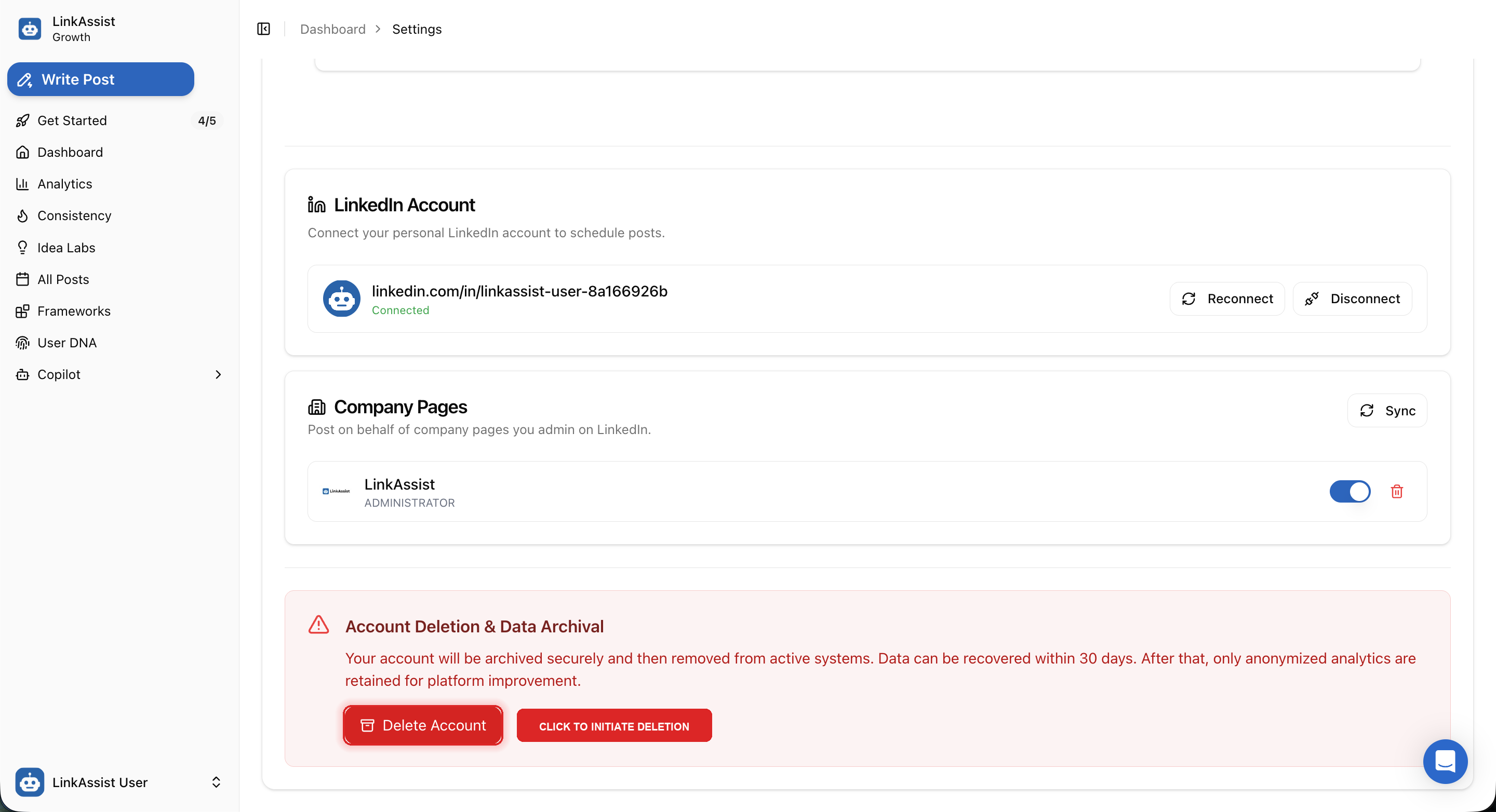
Account deletion is managed directly from the Profile & Connected Accounts section within your workspace settings.
Navigation Path
- Open the sidebar and navigate to Settings.
- Scroll to the bottom card titled Account Deletion & Data Archival.
- Click the highlighted red Delete Account button to open the confirmation and safety modal.
30-Day Recovery Grace Period: Your account is not instantly destroyed. It is removed from active production systems and stored in an encrypted quarantine database for 30 days. You can restore your complete workspace by contacting support during this window.
2. The Archival & Removal Confirmation Modal
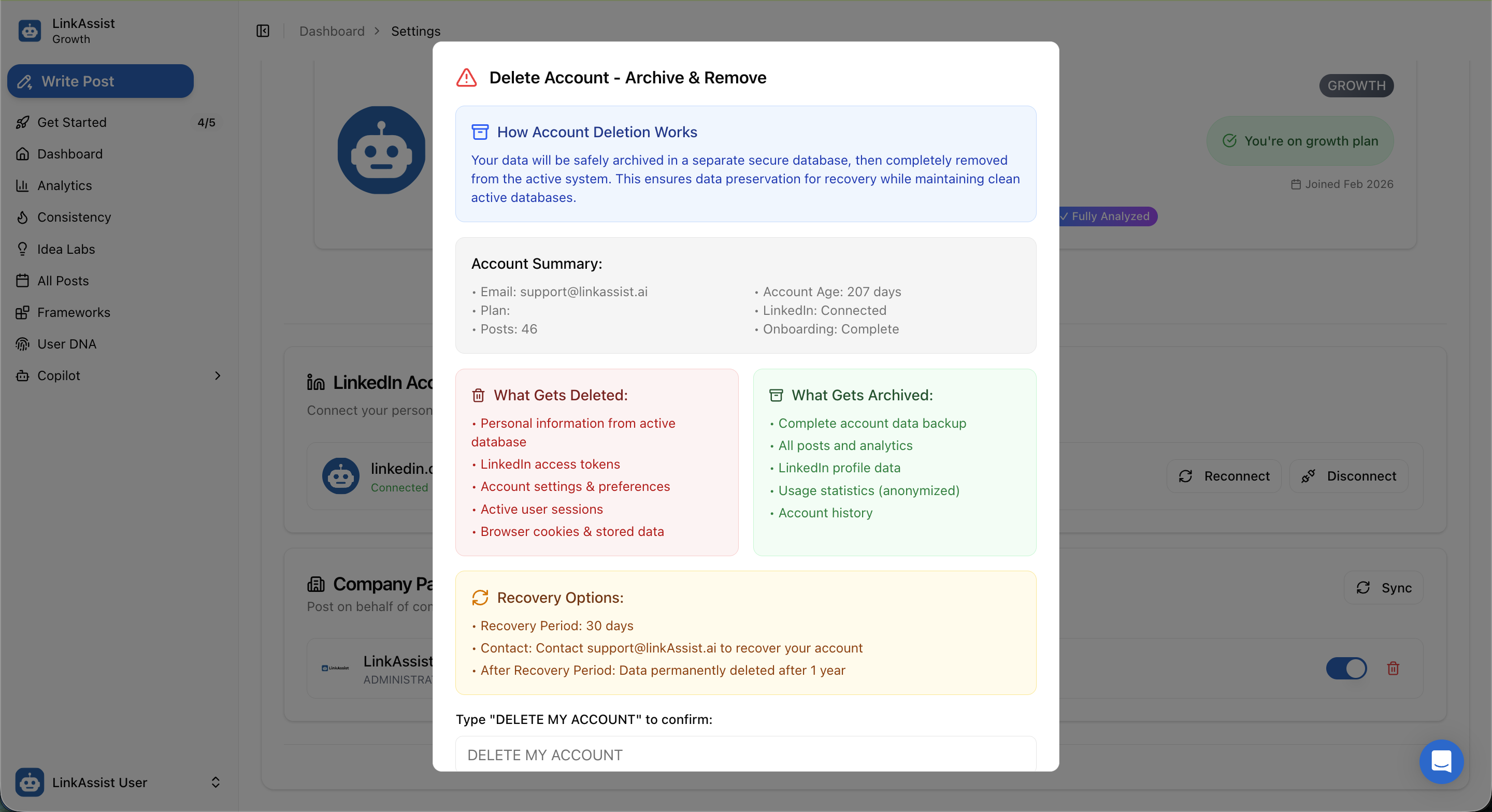
Clicking Delete Account triggers a comprehensive confirmation dialog detailing your current account state and the precise data handling lifecycle.
Account Summary Snapshot
Before confirming, LinkAssist displays your verified profile metadata:
- Registered Email: e.g.,
support@linkassist.ai - Account Age: Total active lifespan (e.g.,
207 days) - Subscription Tier: Current plan (e.g.,
Growth Plan) - LinkedIn Connection: Connected profile handle status
- Total Posts Created: Number of lifetime posts (e.g.,
46 posts) - Onboarding Status: State of completed system steps
3. Data Breakdown: What Gets Deleted vs. Archived
The platform strictly categorizes your information into immediate removal items versus temporary backup archives:
| Category | Immediate Removal (Deleted) | Encrypted Backup (Archived for 30 Days) |
|---|---|---|
| Personal Identifiers | Active database profile entries, email index | Encrypted snapshot for recovery verification |
| LinkedIn Credentials | OAuth access tokens & refresh tokens revoked immediately | Connection metadata history |
| Workspace Data | Active user sessions & browser cookies wiped | Complete post history, draft copy, & analytics records |
| Preferences & Settings | Custom UI preferences & User DNA active context | Template library & tone frameworks backup |
| Aggregated Metrics | None | Anonymized platform performance statistics |
4. Step-by-Step Deletion Process
To prevent accidental one-click deletions, LinkAssist enforces a mandatory confirmation phrase.
Navigate to Settings
Click your profile in the bottom left, select Settings, and scroll down to Account Deletion & Data Archival.
Click Delete Account
Click the red Delete Account button to launch the verification modal.
Review the Summary & Breakdown
Review your account age, post counts, and the list of immediate removals versus 30-day backups.
Enter Verification Phrase
In the confirmation input box, type the exact uppercase phrase:
DELETE MY ACCOUNTFinalize Request
Click the confirmation button. You will be logged out instantly, and your active subscriptions and LinkedIn webhooks will be deactivated.
5. Recovery Policy & Restoring Your Account
30-Day Window
Restore Email
Complete Restoration
Permanent Deletion
Permanent Erasure: After the 30-day recovery period has elapsed, archived data cannot be recovered by our engineering team under any circumstances.
6. What to Check Before Deleting
Before proceeding with account deletion, ensure you have completed the following recommendations:
- Export Important Content: Copy any high-performing drafts, custom frameworks, or swipe files you may wish to reuse.
- Cancel Active Subscriptions: Check Upgrade & Billing to confirm no recurring charges remain pending in the billing portal.
- Review Queued Posts: Check All Posts to cancel or publish any scheduled drafts before revoking LinkedIn access tokens.
7. Related Help & Alternatives
If you are experiencing issues with LinkAssist, account deletion may not be required: