
Support
Reach out to the LinkAssist customer support team for technical assistance, billing inquiries, enterprise requests, and troubleshooting.
Need help with your account, AI generation workflows, LinkedIn synchronization, or billing? The LinkAssist support team is available to help resolve your inquiries promptly.
You can access Support directly from the lower-left account menu $\rightarrow$ Support or by visiting https://linkassist.ai/contact.
Direct Contact & Support Portal
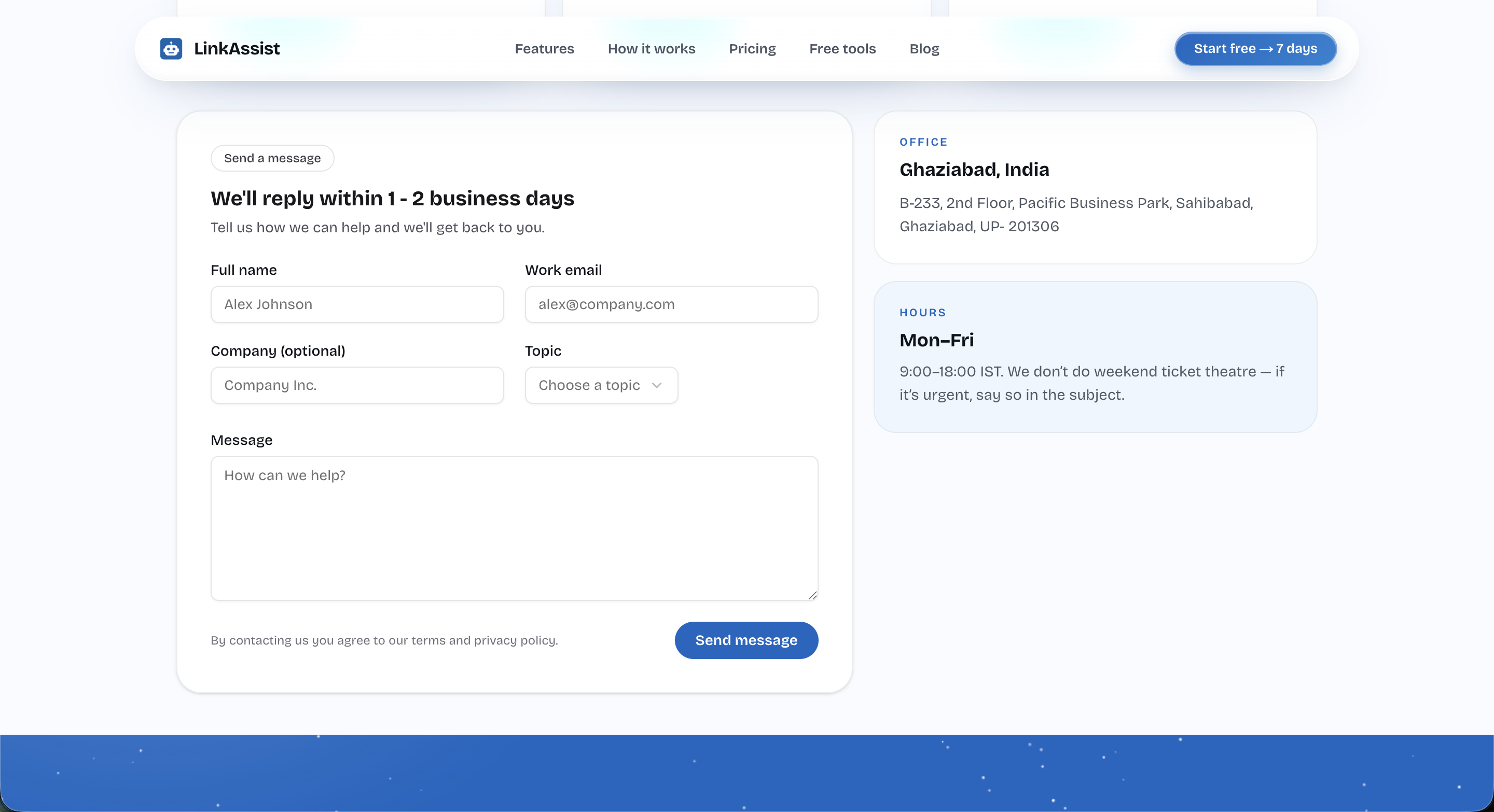
Contact Form Fields
| Field | Requirement | Description |
|---|---|---|
| Full Name | Required | Your complete name or team contact person. |
| Work Email | Required | The primary email linked to your LinkAssist account. |
| Company (Optional) | Optional | Organization, startup, or agency name. |
| Topic | Required | Dropdown category (e.g., Technical Issue, Billing & Invoices, Feature Request, Account Access). |
| Message | Required | Detailed description of the issue, including error messages or screenshots. |
Operating Hours & Office Location
Support Operating Hours
- Schedule: Monday – Friday (9:00 – 18:00 IST)
- Response SLA: 1 – 2 business days.
- Urgent Tickets: If you are experiencing a blocking production issue or billing emergency, include
[URGENT]in your message subject.
Global Headquarters
- Entity: LinkAssist (BDA Technologies)
- Address:
B-233, 2nd Floor, Pacific Business Park, Sahibabad, Ghaziabad, UP - 201306, India
Before Submitting a Support Ticket
To help our engineering team resolve your inquiry on the first reply, please verify the following:
Check Active LinkedIn Connection
Navigate to Settings $\rightarrow$ Account and check if your profile token shows ✓ Connected. Try clicking 🔄 Reconnect if token sync expired.
Verify Browser Extension Permissions
If using the Chrome Extension, ensure it has active permissions on linkedin.com and is logged into the same account.
Review Quotas & Limits
Check Upgrade / Subscription to confirm your monthly post and avatar credits have not been exceeded.
Capture Error Details
Include exact error codes, browser console logs, or screenshots in your initial message.
Priority Support: Growth and Enterprise tier users receive expedited routing and direct WhatsApp concierge support.