
Idea Labs
Turn industry trends, news, and raw thoughts into high-converting LinkedIn post concepts with AI-powered personalized idea generation.
Idea Labs is your infinite ideation engine. It eliminates writer's block by continuously analyzing your calibrated User DNA, trending industry patterns, and real-time news to deliver daily, hook-ready content ideas tailored for your audience.
1. Today's Content Ideas (Personalized Idea Feed)
When you open Idea Labs, you are greeted with a curated selection of daily content concepts designed specifically for your professional domain.
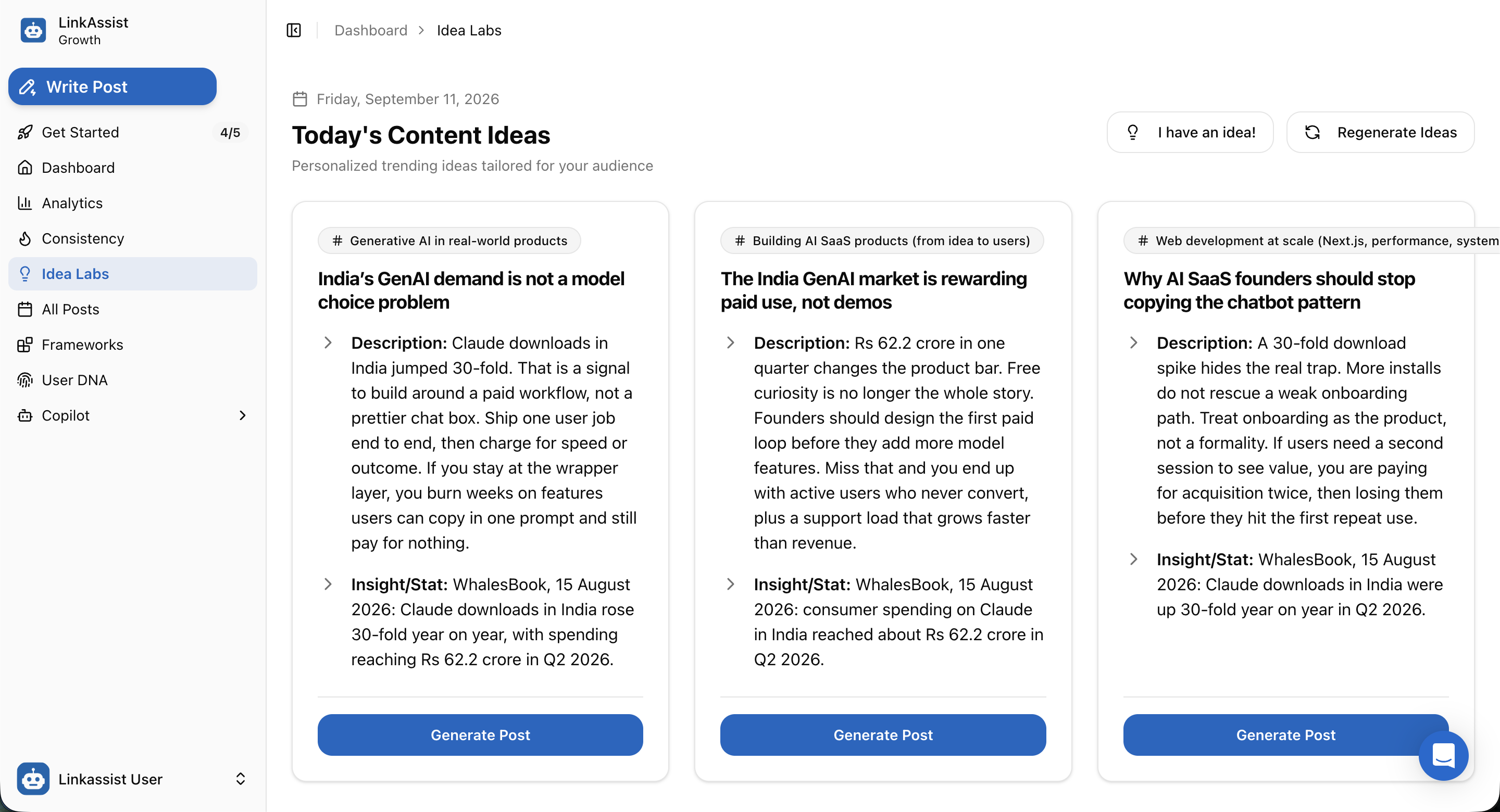
Structure of an Idea Card:
Each generated idea provides complete structural context so you understand why it will perform:
- Niche Category Tag: (e.g.,
# Generative AI in real-world products,# Building AI SaaS products,# Web development at scale). - Hook Headline: A high-impact opening angle designed to stop the scroll (e.g., "India's GenAI demand is not a model choice problem").
- Core Premise & Angle (Description): The strategic breakdown explaining what insight to share, what common mistakes to highlight, and how to frame the narrative.
- Data & Stat Validation (Proof Point): Verified facts, statistics, or quotes to back your argument (e.g., WhalesBook report on 30-fold download growth).
- Generate Post CTA: Click Generate Post to instantly transfer the concept into the Post Writer for 1-click drafting.
2. Real-Time Idea Regeneration
If the current batch doesn't match your immediate focus, you can refresh the recommendations instantly by clicking the 🔄 Regenerate Ideas button in the top right.
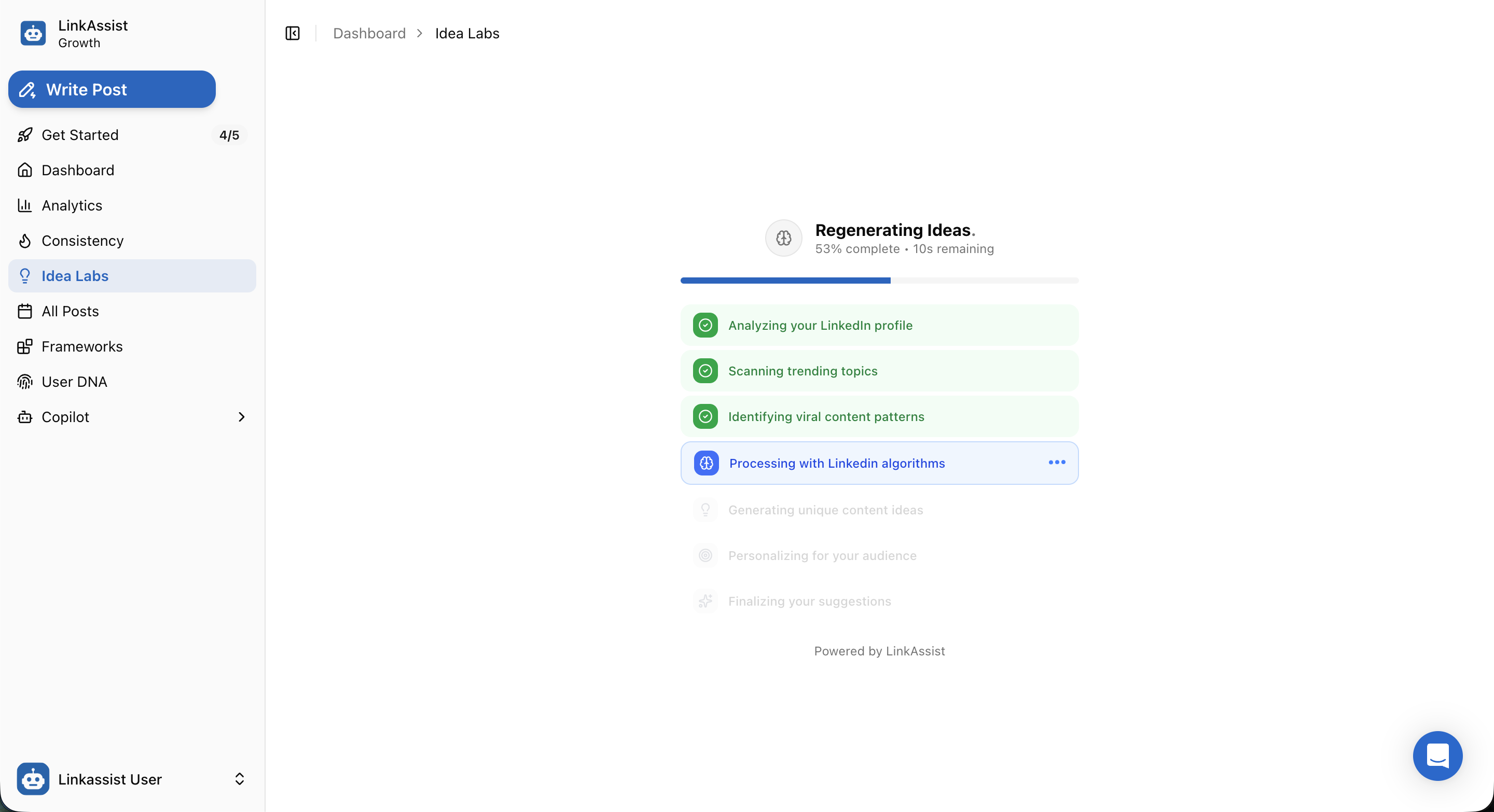
What Happens During Regeneration:
LinkAssist executes a real-time multi-stage AI pipeline:
- Profile & DNA Analysis: Reads your creator niche, past top performers, and audience persona.
- Trend Intelligence Scanning: Aggregates active conversations and emerging keywords across LinkedIn.
- Viral Pattern Identification: Matches trending concepts with high-converting hook structures.
- Algorithm Calibration: Optimizes the generated angles for dwell time and comment interaction.
3. Bringing Your Own Idea (Context & Multi-Source Import)
If you already have a topic, news link, or rough thought in mind, click the 💡 I have an idea! button to open the Post Writer creation studio.
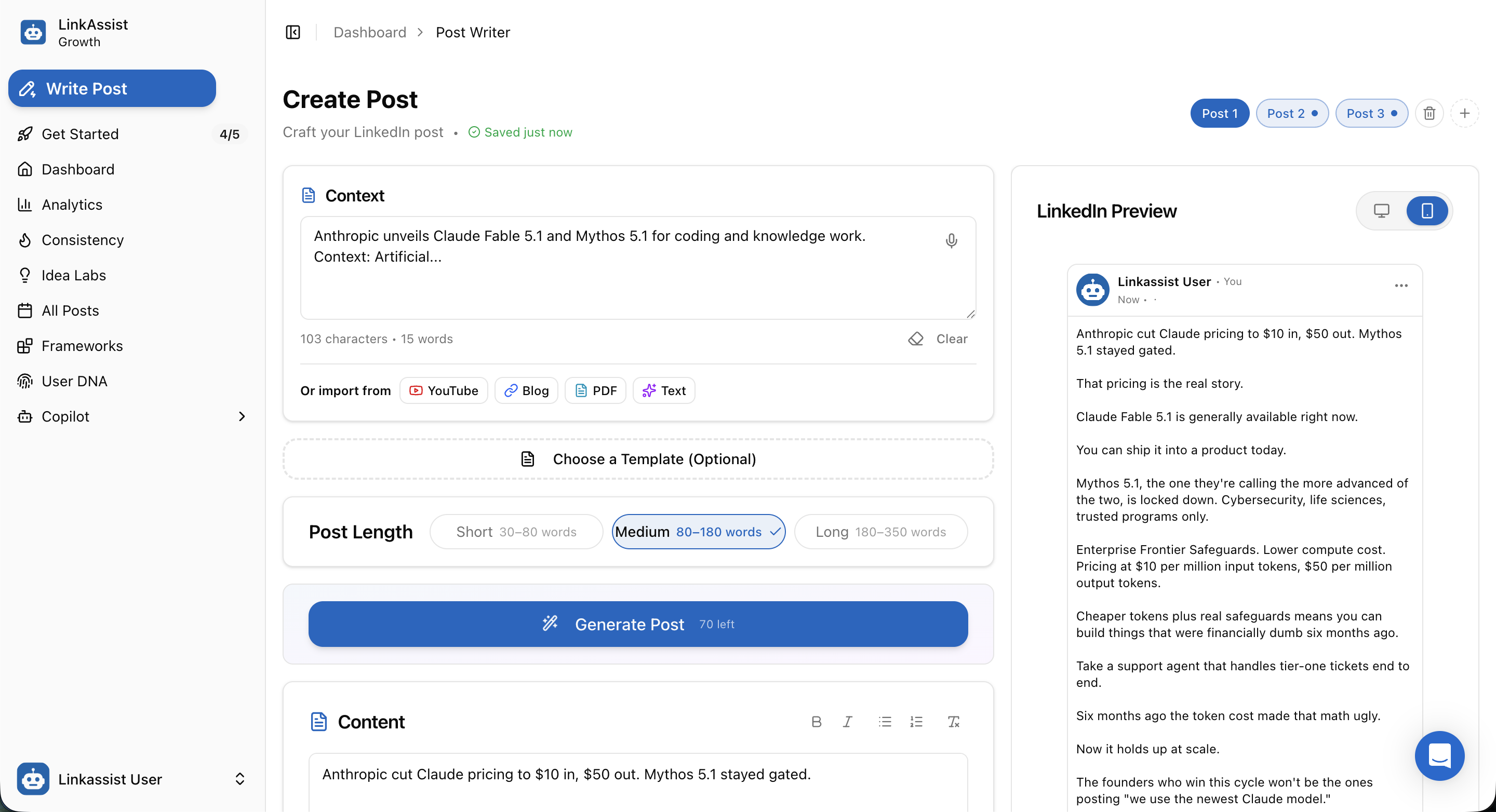
How It Works:
- Provide Context: Type or paste your rough thought into the Context box (or tap 🎙️ for voice dictation).
- Multi-Source Repurposing: Click one of the instant import buttons to draft posts directly from external content:
- ▶️ YouTube — Summarize video URLs into bulleted lessons.
- 🔗 Blog — Repurpose web articles and case studies into punchy LinkedIn threads.
- 📄 PDF — Extract key takeaways from whitepapers and reports.
- ✨ Text — Format unstructured raw notes.
- Configure Post Length: Choose between Short (30–80 words), Medium (80–180 words), or Long (180–350 words).
- Generate & Live Preview: Click Generate Post to produce a formatted post alongside an interactive LinkedIn Preview (toggleable between 💻 Desktop and 📱 Mobile views).
4. Media Enrichment: AI Images & Custom Avatars
Posts with compelling visual media achieve significantly higher dwell time and engagement. Under the content editor, the Media Studio provides three visual creation options:
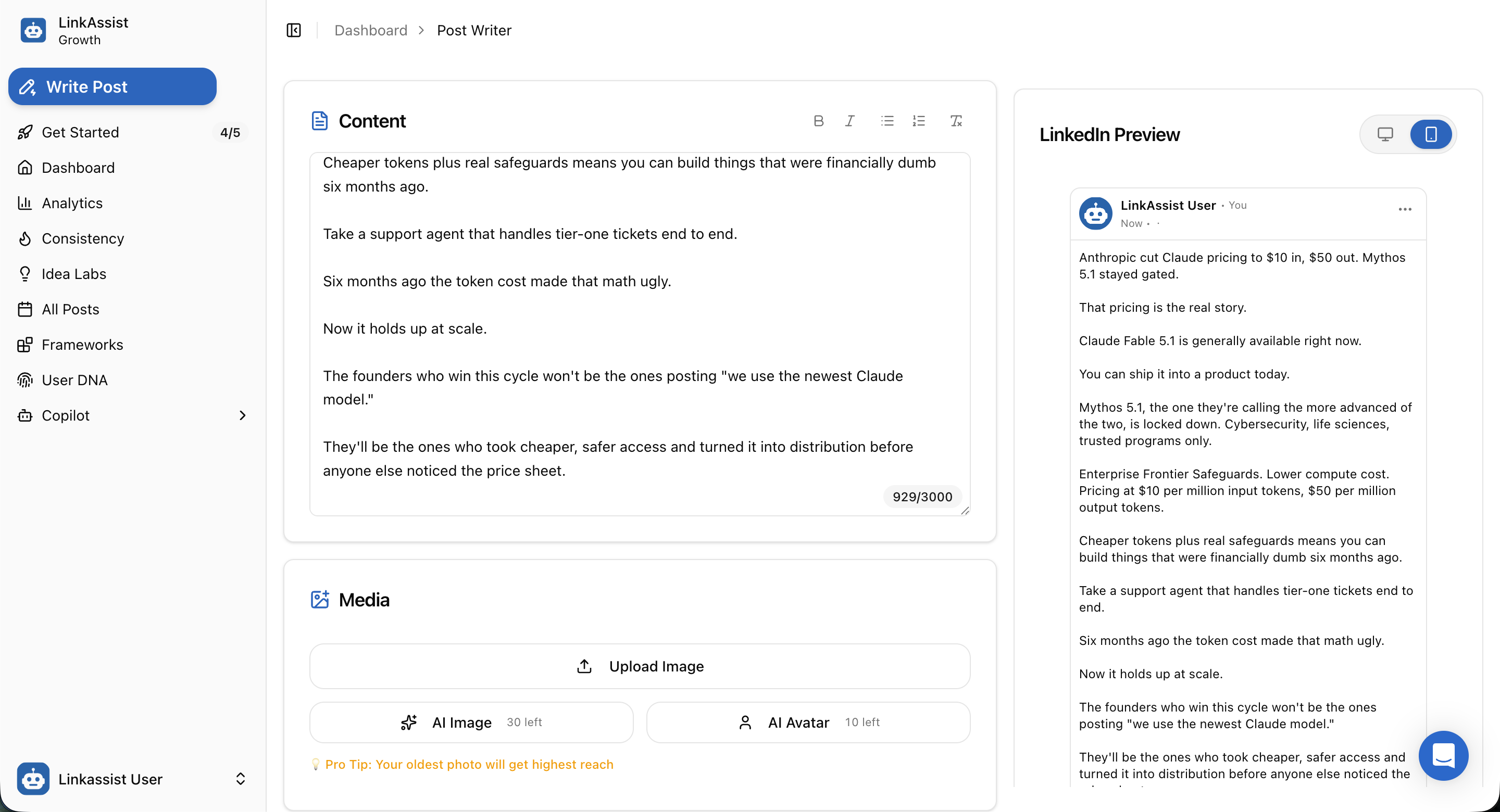
Visual Options Available:
- ⬆️ Upload Image: Upload your own high-resolution photos, screenshots, or infographics.
- 🪄 AI Image Generation: Generate custom contextual illustrations and diagrams tailored to your post topic.
- 👤 AI Avatar: Generate personalized creator portraits and branded visual representations of yourself.
Dwell Time Pro Tip
Authentic, relatable visuals (such as behind-the-scenes founder photos or custom infographics) generate up to 2.5x higher reach than stock photography.
5. News & Ideas (India & Global Real-Time Trends)
Stay ahead of the news cycle with the News & Ideas feed integrated directly into Idea Labs.
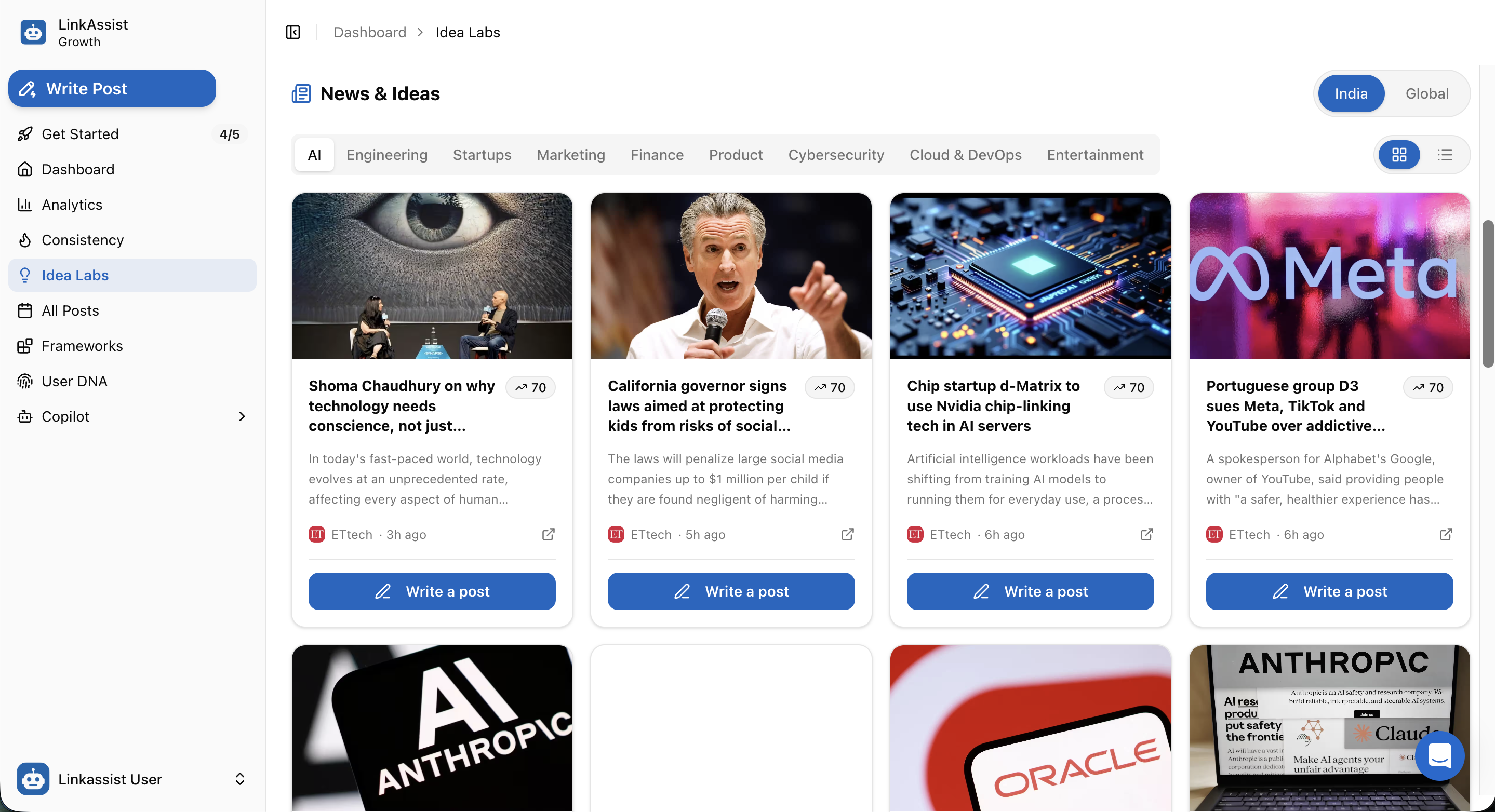
Key News Curation Features:
- Geographic Scope Toggle: Switch between India and Global news feeds depending on your target audience.
- Domain Category Filtering: Filter news by specialized categories:
- AI · Engineering · Startups · Marketing · Finance · Product · Cybersecurity · Cloud & DevOps · Entertainment
- Trend Virality Score: Spot breaking stories with high viral potential (e.g.,
↗ 70trend index). - 1-Click Post Creation: Click ✏️ Write a post on any news card to automatically pull the article's summary, key data, and opinion angles into the Post Writer.
Next Steps
Now that you have high-converting ideas ready, proceed to formatting and scheduling:
Post Writer Studio
Explore advanced drafting modes, tone tuning, and viral hook templates.
Campaign Automation
Group multiple related ideas into scheduled multi-post content series.
Content Calendar
Schedule your generated posts across peak Golden Hour engagement windows.
Frameworks Library
Browse proven viral post structures to pair with your new ideas.