
Log Out
Safely end your active LinkAssist web session, revoke browser authorization tokens, and protect your LinkedIn account across shared or personal devices.
Signing out of LinkAssist terminates your current browser session, invalidates temporary authentication tokens, and prevents unauthorized access to your connected LinkedIn profile, content calendar, and analytics.
1. Accessing the User Menu
To initiate the sign-out process, locate the User Profile card at the bottom-left corner of the sidebar and click it to reveal the account dropdown menu.
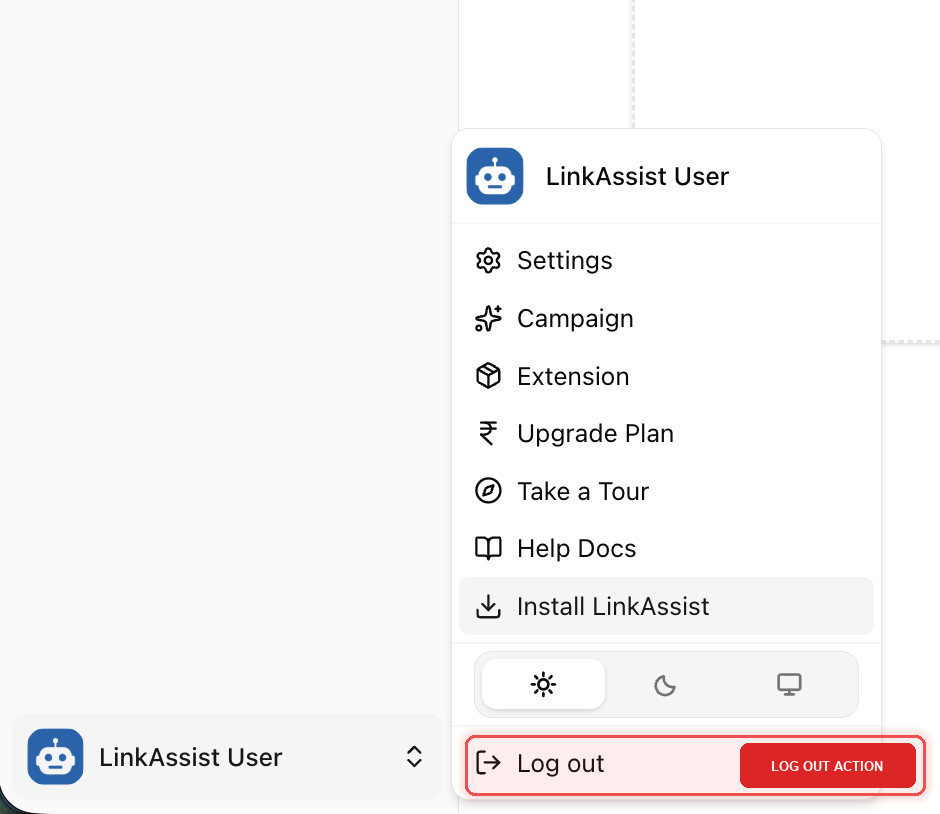
Account Menu Options Overview
When you expand the user menu, you have quick access to:
- Settings: Manage connected LinkedIn profiles, Company Pages, and billing.
- Campaign & Extension: Quick links to extension setups and active campaigns.
- Upgrade Plan: View subscription tiers, usage quotas, and add-ons.
- Take a Tour & Help Docs: Onboarding walkthroughs and complete product documentation.
- Theme Switcher: Toggle between Light, Dark, or System theme preferences.
- Log out (Highlighted): Safely terminate your active workspace session.
2. Step-by-Step Log Out Guide
Click Your Profile Card
In the bottom-left corner of any LinkAssist dashboard page, click the LinkAssist User profile trigger.
Locate the Log Out Action
Scroll to the bottom of the popover menu to find the highlighted Log out button.
Confirm Sign Out
Click Log out. Your browser session will close immediately, and you will be securely redirected to the LinkAssist login portal.
3. What Happens After You Log Out?
Scheduled Posts Continue
Data & Drafts Persist
Session Tokens Revoked
Extension Standby
Scheduled Publishing is Cloud-Based: You do not need to keep LinkAssist open in a browser tab or remain logged in for your scheduled posts to go live on LinkedIn.
4. When Should You Log Out?
Always log out of LinkAssist when using public workstations, shared office computers, or coworking spaces to prevent unauthorized changes to your personal LinkedIn profile and brand.
- Shared Workstations: When sharing hardware with team members or operating on public library/café computers.
- Switching Accounts: When you need to switch between different LinkAssist administrative or client accounts.
- Troubleshooting & Session Refresh: If you experience connection latency or wish to re-synchronize permissions with LinkedIn OAuth.
5. Related Resources
Book a Demo
Schedule a 1-on-1 personalized live demonstration and strategic walkthrough with the LinkAssist product team.
Account Deletion
Understand how to safely initiate account deletion, what data gets removed versus securely archived, and how to recover your account within the 30-day grace period.